<?xml version="1.0" encoding="UTF-8"?>
<feed xmlns="http://www.w3.org/2005/Atom" xml:lang="en-gb">
	<link rel="self" type="application/atom+xml" href="https://forum.eggheads.org/app.php/feed/topic/18108" />

	<title>egghelp/eggheads community</title>
	<subtitle>Discussion of eggdrop bots, shell accounts and tcl scripts.</subtitle>
	<link href="https://forum.eggheads.org/index.php" />
	<updated>2010-11-04T12:01:48-04:00</updated>

	<author><name><![CDATA[egghelp/eggheads community]]></name></author>
	<id>https://forum.eggheads.org/app.php/feed/topic/18108</id>

		<entry>
		<author><name><![CDATA[weezel]]></name></author>
		<updated>2010-11-04T12:01:48-04:00</updated>

		<published>2010-11-04T12:01:48-04:00</published>
		<id>https://forum.eggheads.org/viewtopic.php?p=94966#p94966</id>
		<link href="https://forum.eggheads.org/viewtopic.php?p=94966#p94966"/>
		<title type="html"><![CDATA[Connection Refused (login details are correct)]]></title>

		
		<content type="html" xml:base="https://forum.eggheads.org/viewtopic.php?p=94966#p94966"><![CDATA[
<blockquote class="uncited"><div>What PuTTY sees as ^E is part of the telnet autodetection added in 1.6.20. Clients speaking telnet will have no problems with it. What you are doing wrong is using the Raw connection type instead of Telnet. Why?<br><br>To be able to work normally with the raw type, you must remove the ^E answerback, leaving the field empty. After that you need to type .fixcodes when you log in. The easier and preferred solution, however is to choose Telnet in the initial connection dialog, cause it's actually telnet what you are supposed to use with Eggdrop. That way you won't have problems.</div></blockquote>to be honest, i am not sure why i am using RAW there. i think (im sure) i always used that, not for any particular reason, but just because that's what was recommended. true enough before the version i have now, i did use an older one so i guess that's where my methods became outdated <img class="smilies" src="https://forum.eggheads.org/images/smilies/icon_razz.gif" width="15" height="15" alt=":P" title="Razz"><br><br><br>just tried using the method you suggested, now working fine! thankyou for your help <img class="smilies" src="https://forum.eggheads.org/images/smilies/icon_biggrin.gif" width="15" height="15" alt=":D" title="Very Happy"><p>Statistics: Posted by <a href="https://forum.eggheads.org/memberlist.php?mode=viewprofile&amp;u=11378">weezel</a> — Thu Nov 04, 2010 12:01 pm</p><hr />
]]></content>
	</entry>
		<entry>
		<author><name><![CDATA[pseudo]]></name></author>
		<updated>2010-11-04T03:03:32-04:00</updated>

		<published>2010-11-04T03:03:32-04:00</published>
		<id>https://forum.eggheads.org/viewtopic.php?p=94964#p94964</id>
		<link href="https://forum.eggheads.org/viewtopic.php?p=94964#p94964"/>
		<title type="html"><![CDATA[Connection Refused (login details are correct)]]></title>

		
		<content type="html" xml:base="https://forum.eggheads.org/viewtopic.php?p=94964#p94964"><![CDATA[
What PuTTY sees as ^E is part of the telnet autodetection added in 1.6.20. Clients speaking telnet will have no problems with it. What you are doing wrong is using the Raw connection type instead of Telnet. Why?<br><br>To be able to work normally with the raw type, you must remove the ^E answerback, leaving the field empty. After that you need to type .fixcodes when you log in. The easier and preferred solution, however is to choose Telnet in the initial connection dialog, cause it's actually telnet what you are supposed to use with Eggdrop. That way you won't have problems.<p>Statistics: Posted by <a href="https://forum.eggheads.org/memberlist.php?mode=viewprofile&amp;u=10974">pseudo</a> — Thu Nov 04, 2010 3:03 am</p><hr />
]]></content>
	</entry>
		<entry>
		<author><name><![CDATA[weezel]]></name></author>
		<updated>2010-11-03T20:01:56-04:00</updated>

		<published>2010-11-03T20:01:56-04:00</published>
		<id>https://forum.eggheads.org/viewtopic.php?p=94961#p94961</id>
		<link href="https://forum.eggheads.org/viewtopic.php?p=94961#p94961"/>
		<title type="html"><![CDATA[Connection Refused (login details are correct)]]></title>

		
		<content type="html" xml:base="https://forum.eggheads.org/viewtopic.php?p=94961#p94961"><![CDATA[
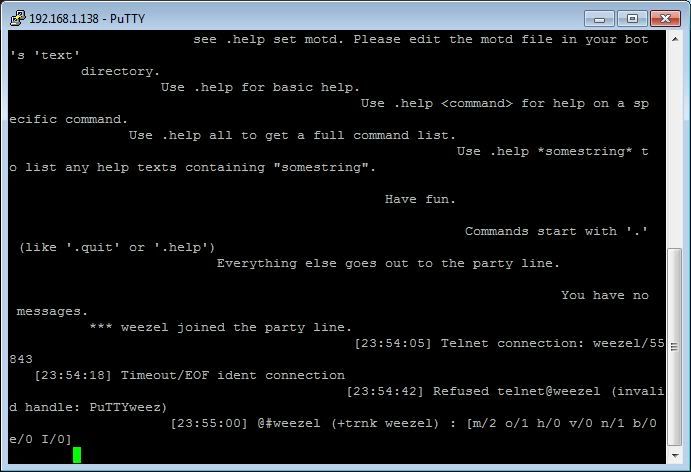
hey!<br><br>so my problem is this. I have (Eggdrop v1.6.20 (C) 1997 Robey Pointer (C) 2010 Eggheads) running, with a few scripts. When i try to log in via putty, i get the following error: <br><div class="codebox"><p>Code: </p><pre><code>BusBot  (Eggdrop v1.6.20 (C) 1997 Robey Pointer (C) 2010 Eggheads)Please enter your nickname.weezelYou don't have access.</code></pre></div>however: if i change "Answerback to ^E:" under "terminal" in the putty settings for that stored account so that its blank, it WILL let me log in but the login then looks like this :<br><br><img src="http://i846.photobucket.com/albums/ab22/wozarib/Misc/putty.jpg" class="postimage" alt="Image"><br><br>Now, that looks horrible. And i've no idea why it's doing that either. But! when i leave it logged in, and then try to login again, this time using putty it its rather default state, again i will see the above error on the new window, but in the window that's already logged in (the messy one), i see this: <div class="codebox"><p>Code: </p><pre><code>[23:54:18] Timeout/EOF ident connection                                          [23:54:42] Refused telnet@weezel (invalid handle: PuTTYweez)</code></pre></div>it's worth noting that the thing in the settings dialogue "Answerback to ^E:" is "<strong class="text-strong">PuTTY</strong>"<br><br>what i cant figure out, is why this is happening. all i want is for the terminal window to look clean! im sure that i've not changed anything to disallow logins as it tells me, but i cant see what effect  "Answerback to ^E:" has, and if it's causing that horribly messy terminal window. <br><br>Any ideas ? :E<p>Statistics: Posted by <a href="https://forum.eggheads.org/memberlist.php?mode=viewprofile&amp;u=11378">weezel</a> — Wed Nov 03, 2010 8:01 pm</p><hr />
]]></content>
	</entry>
	</feed>